AI Photo to Real - Make AI Images Realistic
Turn AI-generated images into realistic photos online free. Remove the AI look, fix plastic skin, and make AI photos look human. No signup needed.
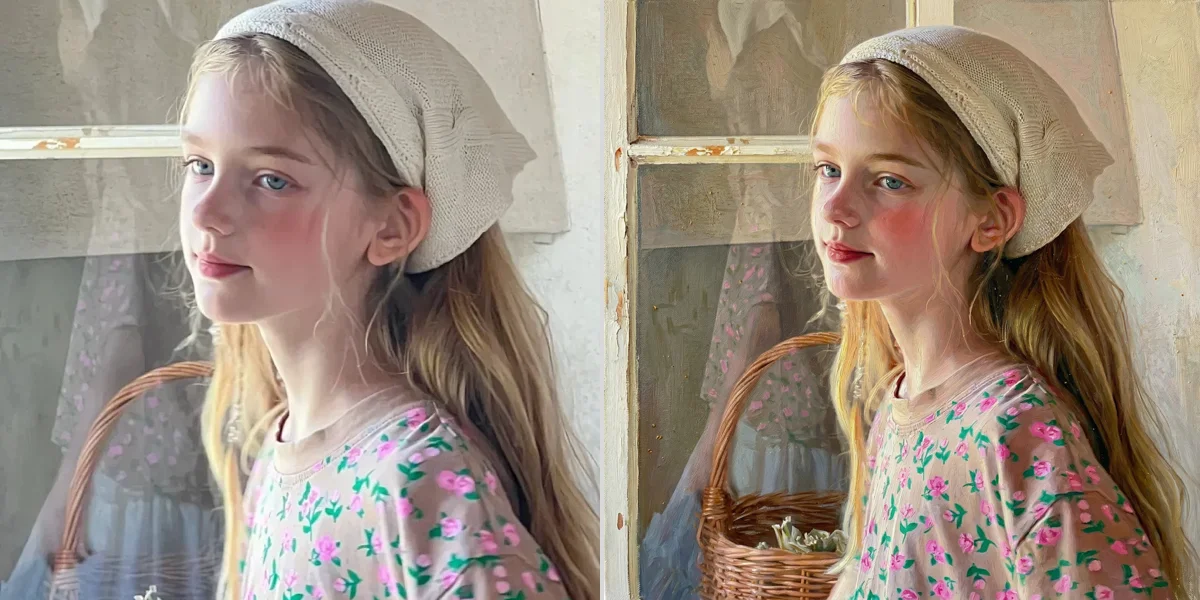
See It in Action
Drag the slider to compare before and after
AI look → realistic photo
Plastic skin and unnatural lighting are fixed to look human.

How It Works
Upload the AI-generated image
Any JPG, PNG or WebP. The higher the resolution, the more the model has to work with when rebuilding texture.
Run the conversion
The model adds skin texture, grain and consistent lighting while keeping the composition and subject unchanged.
Download the realistic version
Compare at 100% zoom — that is where the difference shows. No watermark on the output.
Why use SeedPix for this?
AI images announce themselves in predictable ways: plastic-smooth skin, impossible lighting, hair that merges into the background, and texture that dissolves at 100% zoom. SeedPix targets those specific tells rather than applying a generic filter — it rebuilds skin with pores and variation, adds believable grain, and fixes the light so it falls consistently across the scene.
When to use AI Photo to Real
The situations this tool is actually built for.
Make AI product shots look photographed
Generated product images often look too clean to trust. Adding realistic texture and lighting makes them read as studio photography.
Fix AI headshots for a profile
Smooth, waxy skin is the most obvious giveaway in a portrait. Restoring skin texture is usually enough to make the image believable.
Prepare AI art for print
Print exposes everything — banding, flat skin, missing grain. Converting to a photographic look before export avoids an expensive surprise.
Frequently Asked Questions
How do I turn an AI image into a realistic photo?+
Upload your AI-generated image and click one button. The AI removes the AI look - fixing skin texture, lighting, and artifacts.
Can I remove the AI look from photos?+
Yes. The AI detects common AI artifacts like plastic skin, waxy texture, and unnatural lighting, then regenerates realistic pixels.
Does it work on AI portraits?+
Yes, AI portraits are the most common use case. Fix skin, hair, and eyes to look natural.
Can I make AI images undetectable?+
Our tool makes AI images look more realistic, which can help them pass as human-created. Use responsibly.
What formats are supported?+
JPG, PNG, and WebP files up to 20MB.
Is it free?+
You get 10 free credits on signup plus 1 daily credit. Costs 10 credits per image.
What exactly makes an image look AI-generated?+
The most common tells are unnaturally smooth skin, lighting that does not agree across the frame, hair and fabric edges that blur into the background, and a complete absence of camera grain. This tool works on those specific problems rather than applying one global effect.
Will it change what is in the image?+
No. The subject, composition, pose and framing stay as they are — the model changes how the image renders surface and light, not what it depicts.
Can it fix AI hands or faces that are anatomically wrong?+
Not reliably. This tool changes the photographic quality of an image; it does not correct structure. Badly formed hands or faces are better solved by regenerating the image than by post-processing it.
Ready to make ai images look like real photos?
Upload your photo above and get results in one click. No prompt writing, no original file needed.