Unblur Image Free - Fix Blurry Photos with AI
Unblur images online for free with AI. Fix blurry, out-of-focus, or shaky photos instantly. No signup needed, no quality loss.
See It in Action
Drag the slider to compare before and after
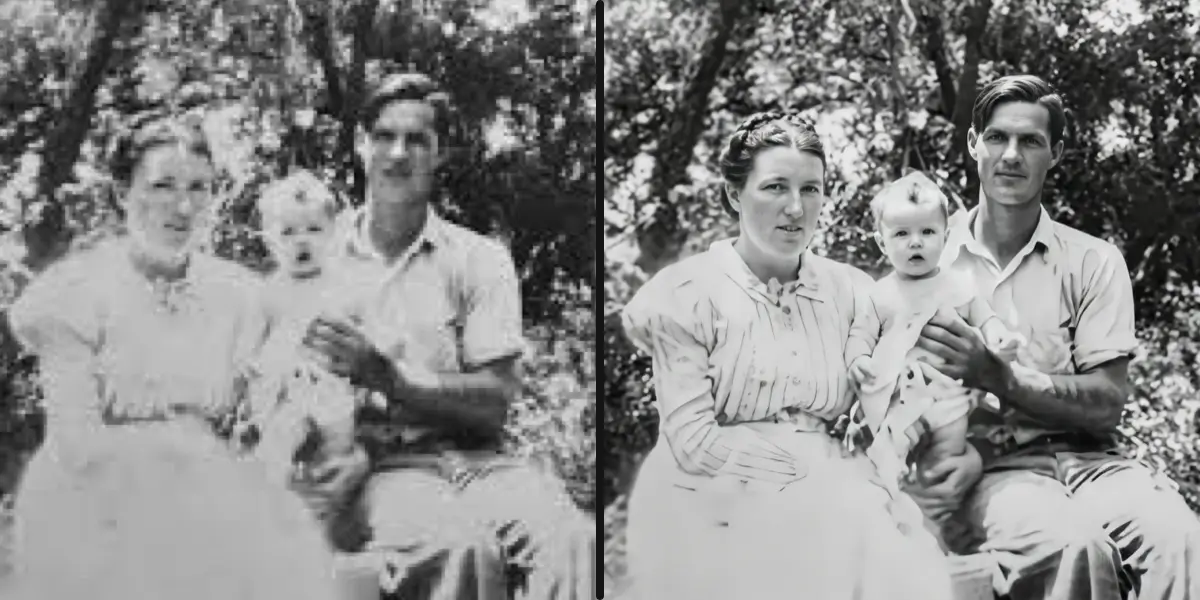
Blurry old photo → sharp
Motion blur and out-of-focus areas are fixed instantly.
How It Works
Upload the blurry photo
Any JPG, PNG or WebP. Upload the original rather than a version that has already been sharpened.
Run the unblur pass
The model estimates the blur profile and reverses it, rebuilding edge definition and fine detail.
Download the sharper photo
Compare before and after at 100% zoom. No watermark, and the file is yours to use commercially.
Why use SeedPix for this?
Sharpening a blurred photo amplifies the blur — it adds edge contrast to detail that is not there. SeedPix treats it as a restoration problem: it estimates what the motion or defocus did to the image and reverses that, recovering edges and readable detail rather than just making the fuzz look crisper. The result reads as a sharper photo, not an over-processed one.
When to use Unblur Image Free
The situations this tool is actually built for.
Rescue a shot that missed focus
One frame out of a burst is slightly soft. Recover it instead of discarding the whole take.
Fix motion blur from a slow shutter
Camera shake and moving subjects both smear detail. The model estimates the direction and amount of movement and compensates for it.
Make a document or receipt photo readable
Photos of text are especially unforgiving of blur. Recovering edge definition can turn an unreadable shot into a usable record.
Frequently Asked Questions
How do I unblur an image online for free?+
Upload your blurry photo and click one button. Our AI sharpens the image, restores detail, and reduces noise in seconds.
Can I unblur images without signing up?+
You can try immediately. To save results and get free credits, sign up for 10 free credits plus 1 daily credit.
Can the AI fix motion blur?+
Yes. The AI detects and corrects motion blur, out-of-focus areas, and compression artifacts.
Will unblurring reduce image quality?+
No. The AI reconstructs missing detail instead of just applying a sharpening filter, so the result looks natural.
What formats are supported?+
JPG, PNG, and WebP files up to 20MB.
How much does it cost?+
Unblurring costs 10 credits per image. Free credits on signup + daily credit included.
How is this different from a sharpening filter?+
A sharpening filter increases contrast along existing edges. If the edge is not there, all you get is a harsher blur. SeedPix estimates the blur itself and reconstructs the missing edge detail, which is why it can recover text and fine texture that sharpening cannot.
How blurry is too blurry?+
Mild to moderate blur recovers well. Once detail is completely averaged out — a long exposure of a moving subject, or heavy defocus on a small subject — there is not enough signal left, and the model can only produce a plausible guess.
Should I unblur before or after upscaling?+
Unblur first. Recovering the edges at the original resolution gives the upscaler real detail to work with; upscaling a blurry image just produces a larger blurry image.
Ready to fix blurry photos instantly with ai?
Upload your photo above and get results in one click. No prompt writing, no original file needed.